

| Made by | CloudBrain |
|---|---|
| Category | Design and BIM |
| Best for | Architects, Engineers, Developers |
| Platforms | Windows, macOS, Web |
| Pricing | Free. Free, with no account and no ads. |
| Facts last checked | 12 November 2026 |
Visit aecobuild (opens in a new tab)Current prices (opens in a new tab)
What can aecobuild do for AEC teams?
| Task | How it helps, and the check |
|---|---|
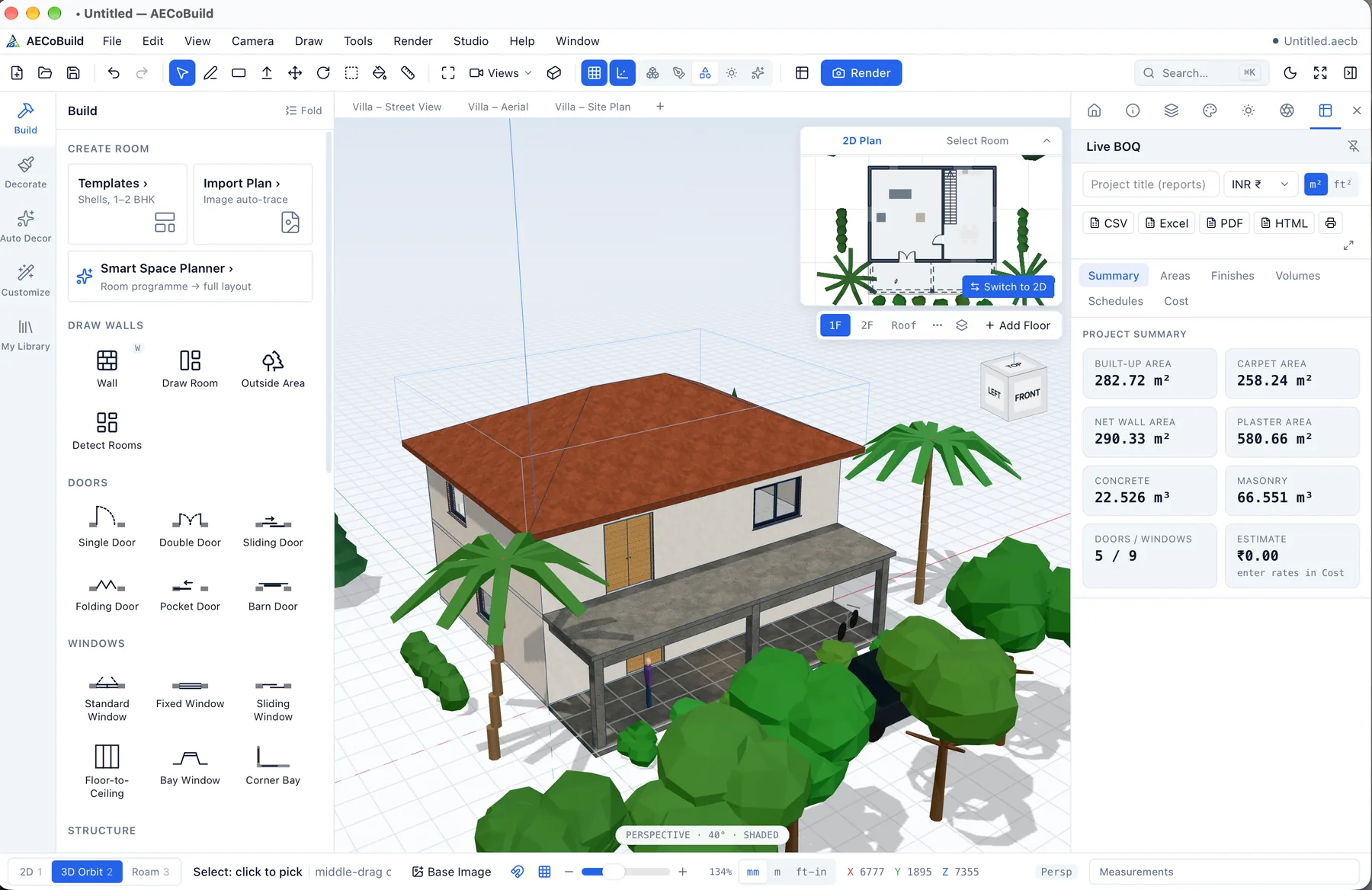
| Massing and modeling | SketchUp-style Push/Pull modeling with inference snapping and typed dimensions, for quick and precise 3D design. |
| Parametric BIM | Layered walls, doors, windows, slabs, roofs, stairs, railings, columns and beams that know what they are. |
| Plans and quantities | Textured 2D presentation floor plans with dimension chains and room areas, and a live bill of quantities with costs in rupees or any currency. Check quantities before tender. |
| Interiors | Interior design studio, one-click styled interiors, modular kitchens, and tile and stone layouts with full and cut tile counts. |
| Exchange and renders | Imports and exports IFC, DXF, OBJ, GLB/glTF and STL, and renders photoreal images with a GPU path tracer. |
Strengths and limitations
Strengths
- Free, with no account and no ads.
- Works fully offline; projects stay on your device.
- Parametric BIM with IFC exchange and a live BOQ in rupees.
Limitations
- It does not open native Revit or ArchiCAD files; exchange with those tools is through IFC, so check models after exchange.
- macOS support is for Apple Silicon Macs (macOS 11 or later).
- Renders and quantities follow your model, so they are only as accurate as the model.
What happens to your data?
- aecobuild's privacy policy says it works offline, projects are stored on your device, and the desktop app has no accounts, analytics or tracking.
- The aecobuild website uses Google Analytics, according to its privacy policy.
CloudBrain’s view
A strong free choice for architects and interior designers who want SketchUp-style speed with real BIM elements, IFC exchange and quantities, and who prefer projects to stay on their own machines. Test IFC exchange with your consultants on a small project first.
What is aecobuild?
aecobuild is a free, offline, SketchUp-style 3D modeler with parametric BIM and IFC exchange, for macOS, Windows and the web, made by CloudBrain. It combines fast Push/Pull modeling with BIM elements, 2D presentation plans, a live bill of quantities, interior tools and photoreal rendering.
What should you check before using it on projects?
- Exchange. Test IFC exchange with your consultants on a small project.
- Quantities. Check the live BOQ against your measurement rules before tender.
- Hardware. On macOS it needs an Apple Silicon Mac.
Disclosure: aecobuild is made by CloudBrain, which publishes this directory. See also free offline alternatives to SketchUp with BIM and the aecobuild product page.
Alternatives to aecobuild
Frequently asked questions
Is aecobuild made by CloudBrain?
- Yes. aecobuild is CloudBrain's own product. This listing uses the same template as every other tool in the directory and states its limits plainly.
Is aecobuild really free?
- Yes. aecobuild is free, with no account and no ads, for macOS, Windows and the web.
Can aecobuild exchange models with Revit users?
- Through IFC, yes. aecobuild imports and exports IFC; it does not open native Revit files. Check models after each exchange.
Sources (checked 12 November 2026)
- aecobuild (opens in a new tab)
- aecobuild privacy policy (opens in a new tab)
- aecobuild (CloudBrain) (opens in a new tab)
CloudBrain is independent of CloudBrain and is not paid for this listing. Features and prices change; check the vendor’s website before you buy. All AI tools